React vs Next.js: How Switching My Portfolio Improved SEO, Performance, and Core Web Vitals by Over 40%
And how a simple plan to add a blog turned into a full-blown SEO glow-up.
When I first rewrote my personal portfolio with Next.js, the motivation wasn’t performance, search rankings, or achieving guru-level mastery of web vitals. It was much simpler:
👉 I just wanted to add blogs to my website.
But what happened next was… unexpected.
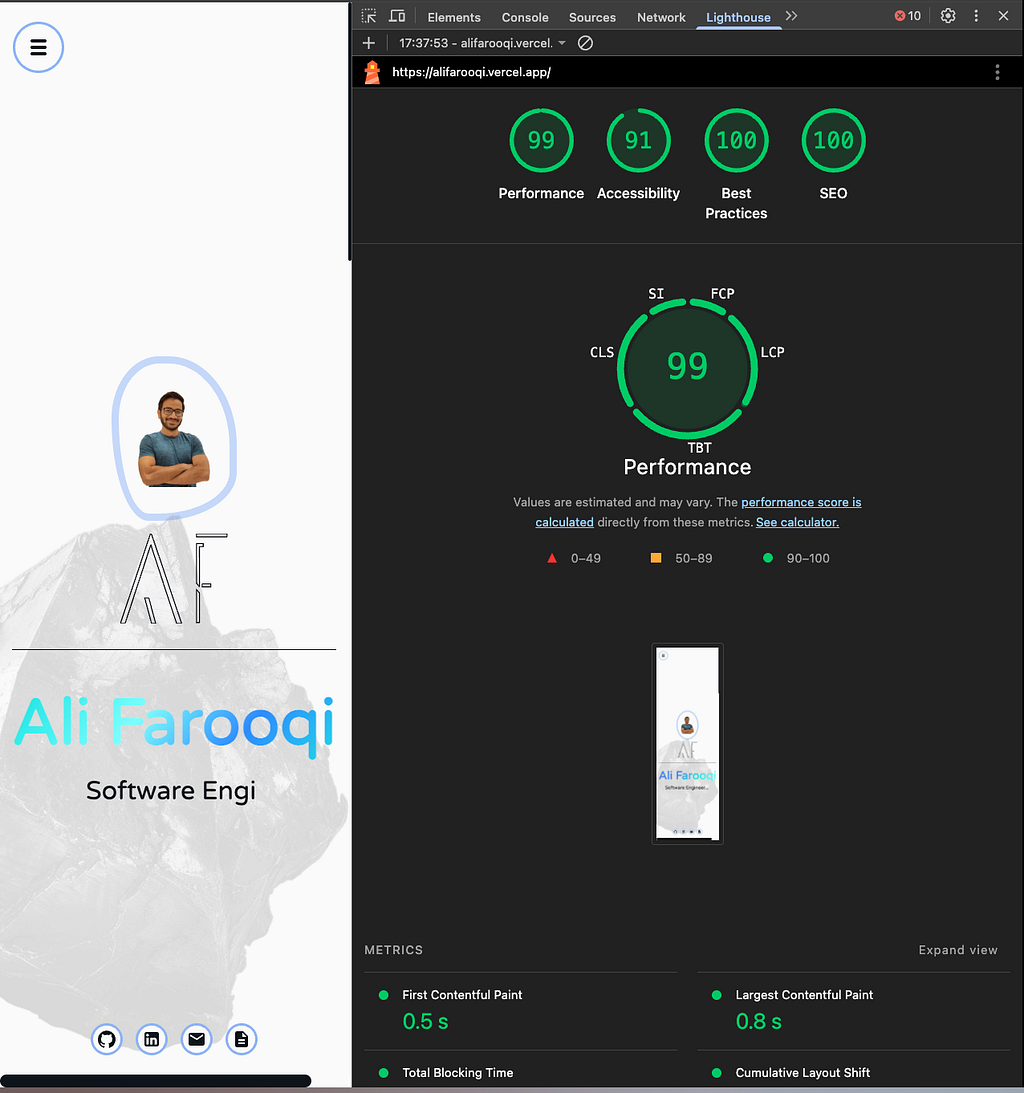
After deploying the new Next.js version on Vercel and running a Lighthouse audit, I discovered that my site’s SEO, performance, accessibility — basically everything — had skyrocketed.
So in this article, I’m sharing the exact React vs Next.js Lighthouse results, the percentage improvements, and why this migration unintentionally fixed my Core Web Vitals.
🚀 Why I Originally Built My Portfolio in React
Like many developers, I started with a classic React + GitHub Pages setup. It was simple, familiar, and perfect for a static portfolio.

But when I decided to start writing blogs, things got messy:
- No built-in routing for dynamic pages
- Manual SEO tags
- Everything was client-rendered
- GitHub Pages wasn’t ideal for serving blog content
So I rebuilt everything in Next.js, mainly to get file-based routing and automatic SEO metadata.
I wasn’t expecting a 40%–60% improvement in performance as a side effect — but here we are.
📊 Lighthouse Scores — React vs Next.js (Real Data)
I ran Lighthouse audits on both versions of my portfolio:
| Metric                       | React   | Next.js | Improvement    |
| ---------------------------- | ------- | ------- | -------------- |
| **First Contentful Paint**   | 1128 ms | 540 ms  | **52% faster** |
| **Largest Contentful Paint** | 1439 ms | 767 ms  | **47% faster** |
| **Speed Index**              | 1508 ms | 552 ms  | **63% faster** |
That’s not a small “oh neat” improvement — that’s a complete makeover.
If my React site was a sedan, the Next.js rebuild turned it into a Tesla set to ludicrous mode.
🧠 Why Next.js Performed So Much Better
Here’s what actually gave Next.js the advantage — even without doing anything crazy in the code.
✅ 1. Server-Side Rendering (SSR) & Static Optimization
My React build was fully client-rendered, meaning:
- The browser downloaded a large JS bundle
- Then React hydrated everything
- Then the page became usable
Next.js, on the other hand:
- Pre-rendered the HTML
- Shipped less JavaScript
- Showed content immediately
Google’s crawler loves HTML. Next.js served Google HTML.
👉🏽 You can guess the rest.
✅ 2. Vercel’s Global Edge Network
GitHub Pages is great for hosting static files, but:
- No aggressive global CDN
- No image optimization
- No smart caching layer
Vercel serves assets from edge nodes worldwide. This alone dropped my FCP by over 500ms.
✅ 3. Automatic Image Optimization with next/image
Even using images “normally,” Next.js silently:
- Converts formats
- Lazy loads
- Resizes
- Compresses
React has none of this out of the box.
✅ 4. Route-Level Code Splitting
React + GitHub Pages = one big JavaScript bundle.
Next.js =
- smaller chunks
- faster hydration
- less JS blocking the UI
It’s like carrying groceries in multiple small bags instead of one bag that’s trying to destroy your fingers.
✅ 5. File-Based Routing + Metadata API → Better SEO
The new blog automatically:
- Generates metadata
- Improves crawlability
- Creates predictable URL structures
- Allows pre-rendering of content
All without touching react-helmet.
🔗 Live Links and Code
React Portfolio (GitHub Pages)
- Live Demo: https://alifarooqi.github.io/
- Source Code: https://github.com/alifarooqi/alifarooqi.github.io
Next.js Portfolio (Vercel)
- Live Demo: https://alifarooqi.vercel.app/
- Source Code: https://github.com/alifarooqi/ali-portfolio-blog
Both are public — feel free to view the code or run your own audits.
🧩 What I Learned from Accidentally Improving My SEO
I migrated to Next.js because:
- It’s great for blogs
- Developer experience is clean
- Routing is effortless
But what I learned afterward is even more valuable:
Next.js isn’t just a framework — it’s an SEO upgrade.
Performance, Core Web Vitals, and Lighthouse scores improve simply by:
- Using SSR/SSG
- Using Vercel
- Using automatic optimizations
I didn’t write special optimizations, redesign my site, or tune Webpack. Next.js simply did what React (alone) couldn’t.
🎯 Final Thoughts (And Why You Might Want to Switch Too)
If you’re building:
- A portfolio
- A blog
- A landing page
- A content-heavy site
- Anything SEO-sensitive
…there’s almost no reason not to use Next.js in 2025.
You get SEO, performance, routing, metadata, and edge rendering right out of the box, without the yak-shaving.
React is amazing — no hate. But for production sites? Next.js just makes everything… better.
If you want higher Lighthouse scores without doing 100 hours of optimization, Next.js might be the cheat code you’re looking for.